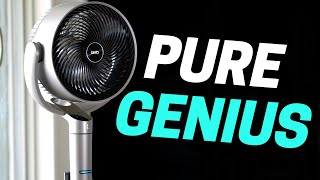

Smart Home Automation Predicts the Future!
43sThe claim that an automation can predict the future is intriguing and hooks viewers to learn more.
▶ Play Clip"Delivers on the promise of a must-have automation with practical examples, though some fluff and sponsor integration pad the runtime."
This video showcases a variety of smart home automations centered around Dreo fans and other devices, demonstrating how to enhance comfort, efficiency, and convenience. The creator explains setups using Home Assistant, pressure sensors, millimeter wave sensors, and other smart home tech, including a standout automation that predicts and restores device states.
When the smart thermostat turns on the AC, a Dreo fan in the corner automatically turns on to circulate cold air evenly across the room. The fan's oscillation angle is limited to blow only toward seating areas, and it's quiet with high spouse approval.
A pressure sensor under the mattress detects when the user lies down during the day and it's slightly warm, triggering the shades to close and a tower fan to turn on, pointed at the bed. The fan is extremely quiet, and when the user gets up, the sensor turns it off.
A new Dreo fan has a built-in millimeter wave sensor that tracks the user's position, automatically adjusting fan direction and speed. It follows the user around the room, increasing speed when they walk away and decreasing when they approach, ideal for garages or workout rooms.
When the user comes home and it's over 100°F outside, the fan turns up to high speed to cool down quickly. This is crucial for surviving Arizona heat.
When the TV turns on while the fan is running, the fan automatically lowers to a quieter speed to avoid interference with audio. This is triggered by a smart home automation.
Using motion and millimeter wave sensors, the fan turns off when no one is detected in the room for 20 minutes, or if the AC turns off and no one is around. This makes the fan fully automated.
A powerful automation captures the state of a fan (on/off) before turning it off when the room is empty. When the user returns, the fan automatically turns back on if it was on before, using a scene created during the off automation. This works with any device and was inspired by a viewer tip.
When the projector and amp turn on for a movie, a Dreo fan turns on if the room is warm, circulating air with cooler air from adjacent rooms. The fan has a built-in temperature sensor for automations.
When CO2 levels are high, a portable AC unit kicks on to lower CO2 and temperature. The unit is powerful yet compact, and can be controlled from a dashboard.
A millimeter wave sensor detects when someone approaches the air fryer and automatically turns on its light, turning off when they walk away. This only runs while the air fryer is cooking, and even impressed the creator's spouse.
The creator uses Home Assistant with a hacks integration to control Dreo devices, as there is no official integration yet. Dreo has launched an extension plugin for Home Assistant that is gradually expanding to more product lines.
The video demonstrates a range of smart home automations using Dreo devices, from simple temperature-based triggers to advanced state restoration and occupancy tracking. The key takeaway is that with the right sensors and a platform like Home Assistant, you can create highly personalized and efficient automations that enhance comfort and convenience.
What sensor is used to detect when a person lies down on the bed for the nap automation?
A pressure sensor under the mattress.
01:53
How does the Dreo fan with built-in millimeter wave sensor adjust its behavior?
It tracks the user's position and adjusts direction and speed: increases speed when walking away, decreases when approaching.
03:05
What triggers the fan to turn down to a lower speed in the TV automation?
When the TV turns on while the fan is running.
04:50
How does the state restoration automation work?
It captures the fan's state in a scene before turning it off, then runs that scene when the user returns to restore the previous state.
05:46
What device is used to automate the air fryer light?
A separate millimeter wave sensor.
09:31
What integration does the creator use to control Dreo devices with Home Assistant?
A hacks integration, as there is no official one yet.
10:39
State Restoration Automation
This automation predicts the user's needs by restoring the fan state after returning, a powerful and innovative use case.
05:46Fan with Built-in Millimeter Wave Sensor
The fan's ability to track and adjust to the user's position is a standout feature that simplifies complex automation.
03:05CO2-Based Portable AC Automation
Using CO2 levels to trigger cooling is a health-conscious and efficient approach to indoor climate control.
08:24Home Assistant Integration
The reliance on a hacks integration highlights the evolving ecosystem and the need for community solutions.
10:39[00:02] is out of this world helpful. It predicts the future. Seriously, it's incredible and every smart home needs this automation. Plus, it works on any device and it's super easy to set up. I have a bunch of new automations to show
[00:15] really like. Anytime someone asks me to come up with automation ideas, I get excited. I love the challenge. Well, Dreo wanted to partner on a video and have it be all about automation ideas using some of
[00:30] their devices. Sounds good to me. And technically, you don't have to have Dreo fans for these automations, but these are the only fans for me. Wait, that came out wrong. Um, let's start with the first automation. Our house has a slight
[00:45] issue that I'm sure most other houses have as well. When our AC is running, all the cold air in this main room ends up in one spot. For us, it's right here on this love seat. So, it could be freezing cold right here and not so cold
[01:00] across the room. Well, with a little home automation help, I can fix this. When my smart thermostat turns the AC on, the DRO fan in the corner automatically turns on. The fan blows the cold air across a room to even it
[01:14] out. It's awesome that I'm able to get these two devices to work together to make my home more efficient with a little home automation magic. What's great about this fan is that I can limit the angle the fan oscillates. That way,
[01:26] it only blows in the direction people are sitting and doesn't blow air on the tree, which would make it really distracting. The fan is also extremely quiet. And Ally says she really likes how it looks. So, high spouse approval
[01:38] factor. I don't know about you, but sometimes, say on a Sunday afternoon, taking a nap is the best thing ever. But what's not so great is waking up from the nap feeling hot and gross. Well, I have another automation perfect for
[01:53] this. Using the pressure sensor under my mattress, when I lay down on my bed during the day and it's slightly warm, the shades close and this tower fan automatically turns on, which is pointed straight at my bed. This is so ideal
[02:06] when the kids have worn me down to complete exhaustion. Help me, and I just automatically turns on and keeps me cool while I nap. This fan is also extremely
[02:18] quiet. Like, can you even hear it right now? I don't know how Dreo does it. And if you've never had a Dreo fan before, you might not realize how noisy some fans really are. This was the old fan we used to have in
[02:38] I'm done napping, the pressure sensor under my mattress turns the fan off. So easy. I don't think setting up an automation gets any easier than this next one. And what's crazy is that even though it's so easy, the actions are
[02:52] super complex. That's my kind of automation. Say I wanted to automate a fan based on where I was in the room. That way, there's always the perfect air flow on me, no matter where I'm standing. I would need to automate the
[03:05] fan position and the fan speed depending on how close I am to it. And I could use a millimeter wave sensor for that for, you know, changing the fan speed. But the positioning, yeah, that might be tough. Well, Drill made a new fan that
[03:19] can do all of that all by itself. There's a millimeter wave sensor built into the fan that can adjust the fan position and speed depending on where you are. So, if I walk back and forth, it will change where it's pointing so I
[03:32] always keep getting air flow. You can see how the fan is tracking me with a if I want to. Yeah, it follows me wherever I go. You could say it's a big wherever I go. You could say it's a big fan of me. And if I walk away, the fan
[03:45] speed increases. And when I walk back toward the fan, it lowers the speed. How amazing is that? This is perfect for a garage or a room where you work out. The time. All you have to do is enable the feature in the app and it's all set up.
[04:01] Like I said, super easy automation with complex actions. Now, most of you probably know that I live in Arizona. Well, stepping outside can feel like you're walking into an oven. So, I set up an automation. When I
[04:17] come home and it's over 100° outside, then the fan turns up really high. It cools my body off fast, which is crucial to survive here in Arizona. That and scorpion spray. If you have both of these, you can survive here, maybe. But
[04:33] what if the kids want to watch something on TV? Normally the fan is super quiet at like level three, but when it's cranked to level eight or nine, lots of cranked to level eight or nine, lots of moving air just makes
[04:50] triggered when something starts playing on the TV. If the fan is on and the TV turns on, then the fan will turn down to a lower speed. Perfect. The fan is never going to interfere. And now the fan is almost completely automated. All it
[05:05] needs to do now is stop running when no one is in the room anymore. Using both the motion sensor and the millimeter wave sensor in the room, I automated the fan to turn off when no one is spotted for 20 minutes. Or if the AC turns off
[05:17] and no one is around, it will trigger an automation to turn off the fan. Now the fan is completely automated, so we don't have to ever manually control the fan ever again. And of course, I'm going to explain how I set up these automations
[05:31] in an article, but I want to take these automations to the next level because Remember at the beginning of the video, I said there was an automation that could predict the future. Well, this is the automation. You have to see this. If
[05:46] I'm in my studio, sometimes I get hot and I manually turn on the fan under my desk. This is great, but I might have to leave the room for a few minutes to get a drink of water or whatever. When the room is empty, everything turns off like
[05:59] you would expect. When I come back, the lights turn back on, but not the fan. You know, I don't want the fan turning on every time the lights turn on. So, what if my smart home was smart enough to see that the fan was on when I left
[06:13] the room and to automatically turn it back on for me when I walked back in only if it was on when I left. Basically, return it to the state that it was before. I'm pleased to tell you that this is possible and it's super
[06:26] easy to set up. When the automation to turn everything off in the room runs, it first creates a scene to capture the state of this fan before it turns the captures the state of the smart outlet this fan is plugged into since this
[06:40] isn't a smart fan. And then for the automation to turn the lights back on, it just runs that scene that I created with the fan. So, if the fan was on before, it automatically turns on again. And if it wasn't on, it stays off. Now,
[06:53] bit. I made it so the fan doesn't turn on if I haven't been in the room for a while. That way, the fan doesn't randomly turn on when I'm walking into let me tell you why this is so powerful. You could use this automation for lots
[07:07] of different use cases. Say you have several fans turned on around your house. You leave to go run some quick errands and all your fans automatically turn off because you've left the house. Well, when you come home, those fans can
[07:19] all turn back on so your house feels exactly like you left it. And it works with any device. It's so cool. And shout out to CJ who emailed me how to do this. Such a great idea. And it really does feel like my smart home sees that I'll
[07:33] want the fan on when I return. And it just does it. I love it. Okay, I know a temperature. You need air conditioning for that. But sometimes blasting the HVAC system just to cool one room down doesn't make a whole lot of sense. For
[07:48] example, when we're about to watch a movie in here, the tiny vent in the ceiling won't do much to cool this room. So, if it's warm in the room, this drail fan will turn on when the automation runs to turn the projector amp and
[08:00] everything else on. That will help blow all the stuffy air and circulate it with the cool air in the room next to it, making it so much more comfortable to watch a movie. And it's nice that all these DRO fans I've shown have a
[08:12] temperature sensor built in so you can use it for automations. And I'm all about smart devices with extra sensors that make life so much easier for automating. On the channel, I've talked about how air quality sensors have
[08:24] really changed my life. Measuring CO2 has been eyeopening how much it can affect my mind. I've tried automating the fans to help lower the CO2, but ultimately I needed to open the window. It's hot outside. I don't want to do
[08:37] that. Instead, the portable AC unit kicks on when the CO2 levels are high. After about 10 minutes, the CO2 drops so fast, and of course, the temperature does, too. I like this DRO portable AC unit because it's not massive, but it's
[08:51] still very powerful. Plus, I can start and stop it from the dashboard on my desk. So convenient. All right, this next automation might feel a bit unexpected and maybe even a bit unnecessary, but some of the best
[09:04] automations seem like that at first and then you realize you can't live without it. So, most of these automations have been about fans and keeping cool. Well, one of the best ways to do that is by not turning on the oven or standing over
[09:17] a hot grill when it's burning up outside. This Dreo air fryer has almost completely replaced baking and grilling for us if the food can fit inside. And this air fryer doesn't heat up our house, which is a huge plus. But check
[09:31] out this automation. When we're cooking, we're always walking up to the air fryer to look inside. This one actually has a light so you don't have to open it. But we find ourselves always turning on the light cuz we're excited to eat. Well,
[09:44] surprise, surprise, I automated it. Now, when we walk up to the air fryer, the light automatically turns on. And when walking away, the light turns off. I'm using a separate millimeter wave sensor to make this happen. And it only runs
[09:57] when the air fryer is cooking. But look how well it works. Even Ally was impressed, which isn't easy to do with an automation. So, spouse approval factor extra high. I think it's because Ally likes this air fryer so much. And I
[10:10] don't blame her. It's pretty sweet. Yeah. So, there's this water tank up while it's cooking to keep it from drying out. I've also been using the and it turns out pretty good for how loweffort it is. And cooking with this
[10:25] is super easy. You just select what food you're cooking either on the screen or to do. And we found that we end up actually eating at home more because it's so easy to cook in this. Out of the box, most of these do devices can be
[10:39] Google. But the way I was able to take these automations to the next level was to automate with Home Assistant. There isn't an official Home Assistant integration, but there is a hacks integration that I use to add all these
[10:52] devices. Dreo has launched an extension plugin that can connect with Home Assistant and is gradually expanding to more product lines, which is good that didn't fully work with it yet. So, I could only control them using Google
[11:05] Assistant commands in a home assistant automation. I won't get into that here, but the article I wrote will have all those juicy details. I'll have that as well as all these DRO devices linked in the description. Dreo is actually the
[11:17] number one brand for household fans on Amazon in the US. So, they have a pretty Amazon in the US. So, they have a pretty big fan base. Get it? Fan base. I better stop before it gets worse. Thanks for watching. Wow, these DRO fans really
[11:31] watching. Wow, these DRO fans really blew me away. Dad, stop the dad jokes. Oh, I get it. You're not a fan. You're a human. Dad, you're so not cool. Oh, good human. Dad, you're so not cool. Oh, good one. These fan jokes keep going around
[11:46] in circles. [Music]


⚡ Saved you 0h 11m reading this? Transcribe any YouTube video for free — no signup needed.