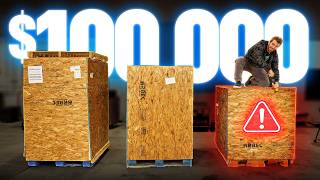

$50K Movie Projector for Cheap?
45sThe massive price drop and mystery of the projector's size immediately hook viewers with the promise of an expensive tech unboxing.
▶ Play ClipThe video documents the purchase and attempted setup of two used Christie CP2230 cinema projectors, originally worth $50,000 each, acquired for a fraction of the cost. The creators explore the projectors' massive size, dangerous xenon bulbs, and complex setup, ultimately discovering that the units are outdated, underperforming, and impractical for home use.
Purchased two Christie CP2230 projectors for a fraction of their original $50,000 price, including shipping from Canada.
The projector's xenon bulb can cause immediate and permanent blindness if viewed within 2 meters.
Unboxing reveals a 3D filter, liquid cooling system, and a massive lens. The projector is heavy due to a milled aluminum base.
After connecting power and a computer via DVI, the projector boots but shows multiple errors (lamp change recommended, circuit board mismatch). It requires clearing errors and a 15-20 minute warm-up.
The projector turns on but appears dim (estimated 6,000-7,000 lumens vs. rated 33,000). After auto-calibration, brightness increases to 11,000 lumens, but image quality is poor with flicker and focus issues.
Input lag is surprisingly good for gaming, but the projector is too old for HDR, producing only bright SDR. The creators conclude it's impractical for any use.
The Christie CP2230 projectors, while impressive in size and potential, are outdated, dangerous, and impractical for modern home use, serving more as a cautionary tale about buying used cinema equipment.
What is the original price of a Christie CP2230 projector?
$50,000
0:03
What is the danger of being within 2 meters of the projector's bulb?
It can cause immediate and permanent blindness.
1:00
What is the rated lumen output of the Christie CP2230?
33,000 lumens
2:07
What type of bulb does the Christie CP2230 use?
Xenon bulb
13:02
What is the estimated actual lumen output of the projector during testing?
Around 6,000 to 7,000 lumens, later increased to 11,000 lumens after auto-calibration.
18:36
What is the power draw of the projector during operation?
Approximately 4,000 watts.
19:07
What is the password for the service account on the projector?
service
19:15
What is the input lag of the projector like for gaming?
Surprisingly good, even better than expected.
21:07
Blinding Danger
Highlights the extreme safety hazard of the projector's xenon bulb, which can cause permanent blindness.
1:00Xenon Bulb Explosion Risk
Reveals the recommended safety gear (full face shield, ballistic suit) for operating the projector, emphasizing its danger.
13:02Lumen Discrepancy
Shows that the actual brightness (6,000-7,000 lumens) is far below the rated 33,000 lumens, indicating age or missing settings.
18:36Surprisingly Good Input Lag
Despite being old and problematic, the projector has low input lag, making it usable for gaming.
21:07[00:00] Inside this box is a Christy CP2230
[00:03] projector. Brand new, this bad boy was
[00:06] worth about $50,000.
[00:09] And that's before any costly 4K or 3D
[00:12] upgrades. But that was 10 years ago. And
[00:15] thanks to the onward march of time, not
[00:18] to mention the slowly dying theater
[00:19] industry, I was able to pick up two of
[00:22] these bad boys for a fraction of that
[00:25] price, including shipping from Canada's
[00:28] second most seceding province. But
[00:31] they're just projectors. Why are they so
[00:33] big? Because these projectors are not
[00:35] just a lamp and some color filters
[00:37] inside of a shoe box like you might see
[00:39] in a home theater setup. These bad boys
[00:42] come with an entire server rack each
[00:44] that handle the inputs, the power, and
[00:47] to be honest, we don't really know,
[00:50] >> which is why we're going to rip them
[00:51] open, attempt to set them up, and see if
[00:54] we can find a use for them. Maybe here,
[00:56] maybe at Whale Land.
[00:58] >> I'd rather not, sir. Why?
[01:00] >> Well, because you see, according to the
[01:02] spec sheets, if anyone is within 2 m of
[01:05] this thing and decides to look at the
[01:06] bulb, they will go blind immediately and
[01:09] permanently. Is this even safe to Ellen?
[01:11] >> Probably not, which is why I decided not
[01:14] to tell the safety team that we were
[01:15] shooting today.
[01:16] >> Okay, that's probably fine. As long as
[01:18] you be sure to tell the safety team
[01:20] >> about our sponsor, you green. Their
[01:22] light and foldable Nexo Air is a great
[01:24] 65 watt charger for all of your Apple
[01:26] devices. You'll get over half a charge
[01:28] on your MacBook Air in just half an
[01:30] hour. Grab yours or learn more about UG
[01:32] Green's Air lineup at the link below.
[01:41] Flash.
[01:43] >> Which one of these are we opening?
[01:45] >> Well, we have to open all three
[01:46] eventually. Which one do you want to
[01:48] start with?
[01:48] >> You don't know what's in them?
[01:49] >> I have no idea what's in wit.
[01:51] >> All right.
[01:51] >> What's in?
[01:52] >> What's in wit?
[01:54] >> That shows how unprepared we are. Let's
[01:57] start with this one, which probably
[01:59] contains a Christy CP2230,
[02:02] a large format projector that's capable
[02:04] of running screens up to 86 ft with a
[02:07] rated output of 33,000
[02:10] lumens. For context, the Epson projector
[02:12] that I used to have in my home theater
[02:14] offered up a pretty awesome bright HDR
[02:17] experience on a 120in screen with uh
[02:21] 2700
[02:23] lumens. It was introduced back in 2012,
[02:26] so it is a little bit on the older side,
[02:28] but over the years, Christy offered
[02:31] multiple upgrades to add 3D capabilities
[02:34] and even to increase the resolution from
[02:36] 2K, which is basically 1080p, all the
[02:39] way to 4K. How did I end up with them?
[02:42] Well, TLDDR, some jokester on the
[02:44] subreddit noticed an IMAX projector on
[02:46] Bid Spotter, and they were like, "That'd
[02:48] be funny." And we were like, "Yeah." But
[02:52] we couldn't get that because it turns
[02:53] out you can't sell those and IMAX
[02:56] actually ended up sending a team to
[02:58] destroy that projector rather than allow
[03:00] some tech YouTuber to buy it. I took
[03:02] that personally. But not every screen in
[03:04] that 15 screen theater was IMAX. So
[03:07] after scrolling past the headless Tintin
[03:10] statues, urinals, and arcade machines, I
[03:13] found that they were offloading all of
[03:15] the other AV gear from the theater as
[03:17] well. So, the idea was that with two of
[03:19] these, I could finally fulfill my dream
[03:22] of building a stereoscopic 3D gaming
[03:25] experience for Whale Land.
[03:27] >> I don't think that's going to work. This
[03:29] would literally melt or shatter any 3D
[03:32] filter.
[03:33] >> But they have 3D. What does that even
[03:35] mean?
[03:35] >> It says that it'll only do 3D at 30 fps,
[03:38] though.
[03:39] >> Yeah, but No, no,
[03:42] >> don't make me pull out the thing.
[03:44] >> That's the lamp one.
[03:44] >> Well, whatever. The point is it said 60
[03:46] fps on the page I showed you.
[03:48] >> But I thought it No, it was talking
[03:49] about 60 fps when you put both of them
[03:51] together. So you get 30 each eye.
[03:55] >> This is my first time looking at it,
[03:56] too, buddy. Okay, we're going to figure
[03:57] this out together.
[03:59] >> What does this
[04:01] >> Oh, did we manage to unbox the one that
[04:04] doesn't have a projector in it?
[04:05] >> Oh, wait. Oh.
[04:06] >> Oh, wait.
[04:07] >> Oh, this is one of the 3D filters. This
[04:11] sits in front of the projector according
[04:12] to the photos on the auction site. Wait.
[04:15] >> Yes.
[04:16] >> That's how it works.
[04:17] >> Yes. That's why our little dinky filters
[04:19] that we had for the 3D at your house
[04:21] would like die.
[04:22] >> So, this has the filters for the left
[04:25] and right eye alternating.
[04:27] >> Oh, I Oh, yeah. You can actually see the
[04:29] separation between them.
[04:30] >> Yeah.
[04:31] >> Oh, that makes so much more sense now.
[04:34] >> How the hell are we going to get that to
[04:37] work?
[04:39] >> We're going to find out. Was this
[04:41] supposed to come with a termination to
[04:43] something? Did they just like cut it
[04:45] from the wall and just give it directly
[04:47] to you?
[04:48] >> It may be a little over our heads here,
[04:50] Elijah.
[04:51] >> Lord Almighty.
[04:52] >> Yep. Yep. Yep.
[04:55] >> That's one one of the filters. Wo. What
[04:58] is all this?
[04:59] >> I think these were wall-mounted if I
[05:02] remember correctly in the auction photo.
[05:04] >> The drywall anchors.
[05:05] >> Wow. They did not
[05:07] on the pallet.
[05:09] I mean, they can't be that heavy then.
[05:12] Oh gosh, sir. Hold on. Sorry.
[05:16] What is rattling? There's so many new
[05:19] screws in here. Okay, so this is just
[05:23] basically glorified switches as far as I
[05:26] can tell. Panic.
[05:28] >> What does that mean?
[05:30] >> Oh god, I forgot there was another one
[05:31] of these. Look, dude, we haven't even
[05:33] gotten to the projectors yet.
[05:34] >> Do we want to open these boxes that came
[05:36] with it? Yeah,
[05:38] I'm afraid to find out what's in them.
[05:41] >> Lens.
[05:45] >> What?
[05:46] >> Shatter.
[05:46] >> That's how you open a lens, right?
[05:48] >> Whoa. Holy crap. These are huge. What do
[05:52] you see, Captain?
[05:54] LAND AOY. I wasted me money.
[05:59] >> Pallet. Pallet one. Pallet. Pallet two.
[06:03] What the Sam heck is up with this
[06:04] pallet? Got this little pinner piece
[06:06] right here.
[06:12] >> Oh, hello. Oh my god. It's like
[06:15] >> I know. That's why I'm like
[06:16] >> Wo, dude. It's so precarious.
[06:18] >> Yeah, I know. That's why I'm over here
[06:19] holding it.
[06:20] >> Is that for cooling?
[06:21] >> Yes. So, in the pictures on the auction
[06:23] site, this was just piped up to the roof
[06:25] kind of like a laundry shoot or like a
[06:27] laundry dryer thing. So, I think it's
[06:29] just heat. Raw heat going to come out of
[06:31] this. Warning. lamp may explode, causing
[06:34] bodily harm or death. I mean, we said
[06:36] this thing was dangerous.
[06:37] >> Yeah, we'd hate to let the people down.
[06:39] >> Someone's got to die of this video.
[06:44] >> What the hell were we thinking?
[06:47] >> Don't you say we you.
[06:50] >> All right, good luck.
[06:52] >> That's only the first one. This gives us
[06:54] a better look at it. So, up here we've
[06:56] got Oh, wow. Kind of beautiful, isn't
[06:58] it?
[06:59] >> So, that right there would be my mirror
[07:00] array, I guess, then. And then behind it
[07:03] would be Oh my god. Like all of this is
[07:07] light source. That's crazy. So this is
[07:11] probably the access hatch for the lamp.
[07:13] >> Oh, they're not locked. Wo.
[07:15] >> Shut up.
[07:15] >> It's liquid cool.
[07:17] >> Shut up.
[07:19] >> Oh my gosh.
[07:20] >> No way. Use Jeff Cool E105. Really? Jeff
[07:24] Cool
[07:25] >> in the movie theater. My name Jeff.
[07:28] >> Oh, dude. Dude, they use colder quick
[07:30] release fittings.
[07:30] >> Oh, so you can These These are the
[07:32] >> Oh, really?
[07:33] >> Yeah. The brand is colder, dude. These
[07:35] are These are like $105 each or
[07:36] something like that back when I
[07:37] researched them cuz I wanted to bring
[07:38] them in at NCIS.
[07:39] >> Well, I'm really glad they didn't cut
[07:40] any corners in a $50,000 projector.
[07:42] >> Also, is this a DDC with like an EK
[07:45] Delin top on it or something
[07:47] >> that I was going to say this looks just
[07:48] like a PC water pump. Like, this does
[07:51] not look like anything custom almost,
[07:53] you know? So, this is a three chip DLP
[07:55] and you've got water cooling one, two,
[07:59] three for each of the DLP chips.
[08:01] >> Is that all in the same loop? I can't
[08:03] quite see.
[08:03] >> Yes, it's all in the same loop and it's
[08:05] coming over to this single 120 mm
[08:07] radiator. So, it's not actually a ton of
[08:09] heat. It's just about the concentration
[08:12] of the heat and getting it away from
[08:14] those chips during I mean long-term
[08:17] operation right?
[08:18] >> If nothing else, this is certainly a fun
[08:20] adventure.
[08:21] >> Do you want to do this one next?
[08:22] >> We can try. All right.
[08:23] >> Should we spin it around for them?
[08:24] >> No. Oh, yeah.
[08:26] >> There's one broken, but I just found
[08:27] this on the floor.
[08:28] >> I think we found the key.
[08:28] >> Oh, let's hope.
[08:30] >> Dude, this feels like a video game.
[08:32] You're just like walking around and you
[08:33] find a random key. You're like, "Oh, is
[08:34] it for the door that I couldn't unlock
[08:35] before?"
[08:39] >> Let's go.
[08:40] >> All right. What's in here?
[08:41] >> Terrible.
[08:42] >> Oh my lord. Okay, I'm very glad we
[08:46] didn't rip this door off because if we
[08:48] turned this on without this shielding
[08:51] here. Oh, I couldn't imagine what that
[08:53] would be like.
[08:53] >> Hey, Elijah, I figured out why the
[08:55] projector's so heavy.
[08:59] >> Oh,
[08:59] >> the entire freaking base is made of
[09:02] milled aluminum.
[09:03] >> Oh, it's one P. Oh my
[09:07] Holy cow. Is this like a chassis
[09:10] detector?
[09:10] >> Yeah. So, we had to keep this closed.
[09:13] >> Yeah, that makes sense. Well, no. We
[09:14] would have had it closed. I was just
[09:15] going to drill out the lock. You're
[09:16] still going to close it.
[09:17] >> Let's look at the IO.
[09:18] >> Uh
[09:18] >> oh, dude.
[09:19] >> DVI, baby.
[09:22] >> $15,000 DVI to HDMI converter.
[09:25] >> General purpose IO, serial 3D sync of
[09:29] some sort, presumably. And then it also
[09:31] takes SDI in. I don't know what server
[09:34] port does, but I think I saw something
[09:36] similar over in the server rack. So, why
[09:38] don't we take a look at that?
[09:39] >> Oh, okay.
[09:39] >> What is this?
[09:40] >> What do you got?
[09:43] Adorable.
[09:44] >> Hacking the main frame.
[09:46] >> Some random gigabit switch. Pass through
[09:48] holes
[09:49] >> with a power bar.
[09:50] >> Um, presumably for this automation
[09:52] controller. So, this is going to be for
[09:55] crap like your, you know, curtains and
[09:57] whatnot, I assume.
[09:58] >> Oh, buddy. Oh, you got a lot of cables
[10:00] back here.
[10:01] >> What am I attached to?
[10:02] >> Like everything.
[10:03] >> Is this a content server? Christy
[10:07] Digital Systems often utilize GDC
[10:09] technology media servers. There's no way
[10:11] that this thing isn't like locked down
[10:14] AF. I mean, the only way to find out is
[10:16] to boot it up, I guess.
[10:18] >> Hey, Elijah, if you were hoping that
[10:19] this rat's nest would be easy to
[10:21] decipher, I got bad news. This is great.
[10:23] It's labeled. Also, they just cut
[10:25] everything out of wherever it was.
[10:27] >> Is that Oh, that is the other end. Okay.
[10:29] >> The worst part is if this label's
[10:30] anything to go by, this is probably the
[10:32] encryption.
[10:33] >> Oh, okay. That's annoying.
[10:35] >> But then I didn't see anywhere for this
[10:38] to plug into back here. So,
[10:40] >> I mean, does that match the projector,
[10:41] though? The answer is yes. It lines up
[10:43] with the port labeled audio AES, which
[10:45] makes sense cuz this is AES out.
[10:47] >> You got a spot for me, boys?
[10:49] >> Nope.
[10:50] >> This gives us a bit of a better look at
[10:52] this machine. Yep. It's a piece of crap.
[10:54] But what it does have is this AJA
[10:56] interface card that I am not super
[11:00] familiar with. IMB interface
[11:02] >> that plugs That looks like the same
[11:03] port.
[11:04] >> Yeah, it is for the GDC card.
[11:05] >> Yeah. Okay.
[11:06] >> And we have that cable. It wasn't cut
[11:07] off.
[11:08] >> Okay, that's good. Well, we don't have
[11:10] to use this. We can just plug into the
[11:12] HDMI in on the projector.
[11:13] >> Oh, yeah. But it doesn't like, you know,
[11:14] can I change the input? It doesn't come
[11:16] with a remote or anything. So, like, how
[11:18] do I manage my interface?
[11:20] >> Try the marriage button. I mean, it's
[11:22] not scary, right?
[11:23] >> Would you rather the panic button or the
[11:25] marriage button?
[11:26] >> Well, they're both the same eventually.
[11:27] >> First one than the other.
[11:28] >> Yeah.
[11:29] >> Found another one that wasn't cut off.
[11:30] So, here's the GPIO.
[11:32] >> Okay.
[11:32] >> Hey, Glenn, you know lenses, right?
[11:34] >> You ever seen this before? Where? Hold
[11:36] on. Where was the
[11:37] >> Oh, unlock first.
[11:38] >> Oh,
[11:39] >> there you go.
[11:40] >> Okay,
[11:41] >> then that should
[11:42] >> Okay,
[11:43] >> lock it.
[11:44] >> I feel like we're putting
[11:45] >> Oh, that went in easier now.
[11:48] >> And then lock. Make sure to lock it.
[11:51] >> Was that it? You just put it in and lock
[11:53] it. I
[11:54] >> That does not seem right at all.
[11:56] >> DL over here.
[11:57] >> Yeah.
[11:57] >> You know what that stands for?
[11:59] >> Big lens.
[12:02] At this point, I think everything else
[12:03] we're looking at is either the GPIO for
[12:06] that automation controller or just like
[12:09] C13 power cables and RJ45 network
[12:12] cables. Like everything here is standard
[12:13] stuff.
[12:14] >> Okay,
[12:14] >> I think we've got everything we need
[12:16] other than power for the projector to
[12:19] try this thing out.
[12:20] >> Okay, I will work on getting it set up.
[12:23] Do you want me to unbox the second one
[12:24] as well?
[12:25] >> I would just leave it for now.
[12:26] >> Okay, well stay tuned, kids. One kissy
[12:30] projector setup later.
[12:32] >> Wow. You did this all on your own?
[12:35] >> Sort of. I can't take full credit.
[12:37] >> I think you mean no.
[12:39] >> I actually emailed Christy and they
[12:41] actually got back to me within about a
[12:43] day.
[12:43] >> Oh,
[12:44] >> and they emailed me all of the manuals,
[12:46] all of the instructions for this model
[12:48] of projector.
[12:49] >> Wow. Okay. They also gave us a huge
[12:51] safety warning. You remember how we
[12:53] opened that lamp at the beginning and we
[12:55] were like, "Wow, this looks cool."
[12:57] >> Yeah, it did look cool.
[12:57] >> Yeah. It will kill you if it explodes.
[12:59] >> Oh, cool.
[13:00] >> That makes it even cooler.
[13:02] >> It's a xenon bulb. And I'll put footage
[13:03] of what they look like exploding here.
[13:05] Um, but they actually recommend that you
[13:07] wear a full face shield, ballistic suit,
[13:09] and safety gloves when you're operating
[13:11] it. And we were just like, ooh,
[13:14] it was really not okay. But the good
[13:17] news is I didn't have to go in there in
[13:18] order to get it working. After I emailed
[13:20] Christy, they gave me all the manuals.
[13:21] They then ghosted me.
[13:22] >> Oh. I think that what happened was when
[13:24] they were trying to get me in touch with
[13:25] a Christy certified representative Yeah.
[13:28] >> they all basically were like, I don't
[13:30] want to touch this thing.
[13:31] >> Yeah. Cuz it was shipped Lord only knows
[13:33] how with all those bulbs in it.
[13:36] >> Yes.
[13:36] >> And has been touched now by us.
[13:39] >> Yeah. But
[13:40] >> damaged goods basically.
[13:42] >> It was enough for us to get it up and
[13:43] running.
[13:43] >> Okay.
[13:44] >> Would you like to fire it up or
[13:45] >> I would.
[13:46] >> Okay. Step one, we have to plug it in
[13:51] >> over there, sir. Step two, we need to go
[13:53] underneath and flip two switches down
[13:55] there.
[13:57] Would you like me to do it? You're sore.
[13:59] >> No, I'm good.
[14:00] >> Okay. Yes, that's switch one. And you
[14:02] should hear it pretty soon here. Start
[14:04] firing up.
[14:04] >> Wait, I I flipped two switches.
[14:06] >> Oh. H. It's probably fine. Hey, it's
[14:08] booting.
[14:09] >> There we go.
[14:10] >> What does this thing run like? Windows
[14:12] 98.
[14:13] >> I'm not really sure what it runs.
[14:14] >> That was an old school BIOS.
[14:16] >> It's very old. Yes, it can take like 15
[14:19] to 20 minutes to heat up, so it might be
[14:21] a while.
[14:23] Should I be the one to tell them?
[14:25] >> The lens is pointing that way and your
[14:27] projector screen is there.
[14:29] >> Yeah. Well, this is a movie theater
[14:30] projector. I wanted a bigger display.
[14:32] >> Ah, I see.
[14:33] >> And then if it really sucks, maybe we
[14:35] can turn it around.
[14:37] >> While we wait, should we fire up the
[14:38] digital cinema server?
[14:39] >> It's not actually needed. This is only
[14:41] required for when you have all the
[14:42] licensing to deal with when you are
[14:45] leasing a movie in order to project it
[14:46] in a movie,
[14:47] >> which we don't. Instead, we're just
[14:49] going to use the DVI to HDMI converter
[14:51] that was thankfully included, and we're
[14:53] just going to hook up a computer to it,
[14:54] and we're going to game. Okay, so we've
[14:56] got an error. Light change recommended.
[14:59] We acknowledge this error.
[15:00] >> Circuit board serial numbers do not
[15:02] match.
[15:04] >> It's fine. One of the things you'll
[15:07] >> Yeah, it's fine. One of the things
[15:08] you're going to notice about this is it
[15:10] will probably give us an error. We'll
[15:11] clear the error. It'll give us two more.
[15:13] That's why it actually took me so long
[15:15] to get this thing up and running. And we
[15:16] might just have to do a couple more
[15:18] today. It's in working condition. And
[15:20] that's actually what these lights are.
[15:22] At a quick glance, you could see, oh,
[15:23] there's an error I have to clear. This
[15:24] is just a warning versus we're all good
[15:26] to go.
[15:27] >> Oh, our temperatures are all critical.
[15:29] Wait.
[15:29] >> Uh,
[15:30] >> warning. It will reboot.
[15:31] >> These are all very It rebooted. These
[15:34] are all very new errors. So, thank you.
[15:37] >> But I didn't do anything.
[15:38] >> You walked on to set. When this actually
[15:40] does turn on, do not stand there, Glenn.
[15:42] One of the things that we determined is
[15:44] while it's not as hot as it was warning
[15:46] us, it will blind you. When I got it
[15:48] booted before, I was probably 10 meters
[15:50] away and I happened to look back, I saw
[15:53] spots for the rest of the day. So, if
[15:55] you're like within 2 m, you you're done.
[15:57] Um,
[15:57] >> don't do that.
[15:58] >> Oh, I I did it by accident.
[15:59] >> Well, yeah, but don't do it by accident.
[16:01] >> Yeah, thank you, Captain Hindsight.
[16:03] Like,
[16:05] >> it's not even hindsight. We knew that
[16:07] already.
[16:08] >> Yeah, but I didn't like think about it.
[16:09] It's just like, oh, it's just a
[16:10] projector. It'll be fine. So now what we
[16:12] should be able to do is we can actually
[16:14] initiate power cuz this isn't on yet,
[16:16] >> right?
[16:16] >> This is just kind of getting us to the
[16:18] interface. So we need to hit the power
[16:20] button.
[16:20] >> All right,
[16:21] >> there we go.
[16:22] >> Hey, there's your cooling fans, buddy.
[16:24] >> Yes. So now it's really starting here.
[16:28] That blue tape is critical
[16:29] infrastructure. Um, we discovered that
[16:32] it gives an error when it's trying to
[16:34] exhaust, but there's an actual like
[16:37] mechanical thing that's supposed to open
[16:38] and like vent more. Yeah.
[16:40] >> So, we've just made it vent all the
[16:41] time. So, that that blue tape is
[16:44] critical for this.
[16:45] >> Oh, okay. It's just like holding down
[16:47] the flap.
[16:48] >> Yeah, basically. So, it's starting DLP
[16:50] and IMB. That has to do with the
[16:52] connection back to this interface. It
[16:54] will fail, which is fine because we
[16:56] don't need it. There's workaround space.
[16:58] >> Can we just cancel it?
[16:59] >> No, because you still have to let it go
[17:00] through the process. So, one moment,
[17:02] please.
[17:02] >> I'm starting to come around to the
[17:04] realization that I have purchased
[17:05] e-waste.
[17:06] >> Oh, yeah. And you bought two of them.
[17:08] So, now we're finally ready to actually
[17:10] turn on the bulb.
[17:11] >> Big moment.
[17:11] >> This is the moment where no one is
[17:13] allowed to walk in front of this
[17:14] projector. And this is where you're
[17:15] going to be very disappointed.
[17:20] >> Is it on?
[17:21] >> Yes.
[17:24] >> Thought you said it was bright.
[17:25] >> It is when you look at it, but these
[17:28] things are optimized for being in a
[17:29] pitch black movie theater. Now, there
[17:32] are some things we can do to verify that
[17:34] there is something on the screen. We can
[17:35] go to the test patterns and we can
[17:37] actually display something.
[17:40] >> Oh, it is totally working.
[17:42] >> Yes. Now, obviously it looks like we're
[17:45] down to the left right now.
[17:46] >> Oh, yeah.
[17:47] >> But
[17:47] >> we have lens shift, right?
[17:49] >> There is a whole bunch of lens shift in
[17:50] here. And obviously there's all your
[17:52] focus, your zoom, and everything else in
[17:53] here. So,
[17:55] >> so we could just Oh,
[18:01] wait. That's as far right as it goes.
[18:02] >> What can I tell you, dude? Like this is
[18:04] you bought this.
[18:06] >> Is it meant to sit like way at the back
[18:08] right?
[18:08] >> Well, no. It's centered.
[18:10] >> Yeah, but I already moved it all the way
[18:11] to the right. Can I not move it up?
[18:13] >> No. You also got to remember this thing
[18:15] is supposed to be mounted like at the
[18:16] top of your movie theater aiming down.
[18:21] I mean, we can throw it on a forklift.
[18:22] >> Okay. Zoom though. We have zoom.
[18:24] >> Yeah. So, you can obviously make it
[18:26] freaking massive.
[18:27] >> I can't believe how not that bright it
[18:29] is.
[18:29] >> You got to remember, very old lamp
[18:30] already in here. And one thing Lucas and
[18:32] I did discover, which we can find in the
[18:33] settings again, this is not 33,000
[18:36] lumens like it claims, it seems to be
[18:38] around the 6 to 7,000 lumen mark. And I
[18:43] don't know if that's because of the
[18:45] actual lamp itself,
[18:46] >> right?
[18:47] >> Or if there's a setting that we're
[18:49] missing that's specifically unlocked by
[18:52] like a Christy certified technician.
[18:55] >> Wow, it looks just like an old crappy
[18:58] projector. It's got the flicker and
[19:00] everything.
[19:01] >> It's pretty bad. Another thing is, do
[19:04] you want to guess how much power this is
[19:05] drawing?
[19:05] >> 2500 watts.
[19:07] >> Let's find out. Cuz last time we
[19:09] checked, this was about 4,000 watts. Oh,
[19:12] I might have to log into the service
[19:14] account, which we found out the password
[19:15] for the service account was service.
[19:18] >> Nice.
[19:19] >> Oh, yeah.
[19:19] >> Intensity. 5800 lumens.
[19:22] >> Yeah. So, that's roughly what we think
[19:23] the lumen count is. We couldn't actually
[19:25] verify that,
[19:26] >> right? Wow. There's so much that you can
[19:29] do manually on this. You can move the
[19:30] light.
[19:32] >> It's and the lens. Oh, I wonder if
[19:34] that's why our default is like way the
[19:36] crap over there.
[19:37] >> Maybe
[19:38] >> do auto.
[19:42] >> Oh, it's definitely doing something. Oh,
[19:43] wo.
[19:44] >> Hey, it got brighter for a second there.
[19:46] It actually looks like it's doing
[19:47] something.
[19:48] >> Yeah, she's got some brightness in her.
[19:50] Well, that's brighter.
[19:51] >> It finished and it's at 11,000.
[19:54] >> Yeah, buddy. Okay, that definitely looks
[19:57] a lot brighter now. And it's more in
[19:59] focus than what you got it to. So,
[20:00] >> and it seems to be flickering even more.
[20:04] >> Well, can't win them all.
[20:07] >> Okay, what else we got?
[20:09] >> Let's put that rainbow test pattern on
[20:10] again. OH, WOW.
[20:11] >> WO,
[20:12] >> THAT IS A LOT more vibrant.
[20:14] >> Okay, now we're cooking with gas.
[20:17] >> Do you like the focus?
[20:19] Yeah, I couldn't help noticing that it's
[20:21] bang on right here and then off both
[20:25] here and here.
[20:26] >> We think we might have an issue with the
[20:28] lens alignment cuz if you look even in
[20:30] the top left, the light starts to like
[20:31] fade off. So, we're not sure if we're
[20:34] missing a piece to help center it or if
[20:36] we just sucked at putting it in. But,
[20:38] >> I mean, speak for yourself. I got three
[20:40] kids. Doing anything on this is
[20:42] horrible,
[20:43] >> man. I um
[20:45] >> Do you think this is the most you've
[20:48] regretted a purchase?
[20:50] >> No comment.
[20:51] >> Yeah,
[20:51] >> the firetruck was a better investment.
[20:54] >> Oh, literally though. We will yield no
[20:56] further content and no further use from
[20:59] these whatsoever.
[21:01] >> But hey, maybe if one of you guys wants
[21:04] one, we have two. Hit us up.
[21:07] >> The input lag is
[21:08] >> I was I was just going to say
[21:10] >> way better than I expected. like
[21:13] extremely usable, maybe even good.
[21:18] >> This is significantly better than I
[21:19] thought.
[21:20] >> That's what I'm talking about.
[21:21] >> Holy cow, we're so bad. Okay, now we
[21:24] just need to
[21:25] >> I got an idea. I got an idea. What if we
[21:27] fired it through the door in the theater
[21:28] room
[21:30] and see if we can hit the screen that's
[21:32] in there?
[21:33] >> And then anybody who turns around and
[21:35] leaves dies cuz they can't they can't
[21:37] get out the door.
[21:38] >> We'll be fine. We got this.
[21:39] >> We're not doing it, dude.
[21:42] This is freaking ridiculous. There's
[21:45] kind of a shadow in the top left and I
[21:47] figured it out. Do not look at the lens,
[21:49] but point the camera toward the lens.
[21:51] And you can actually see we shifted the
[21:53] lens so much.
[21:55] Like lens shift is literal lens shift.
[21:59] So there's vignetting cuz the image is
[22:01] way over here. Okay, I think that's as
[22:02] good as it's getting. Elijah, are you
[22:04] going to be able to get in here?
[22:04] >> Oh yeah.
[22:05] >> Oh man, I love climbing into my movie
[22:08] theater.
[22:15] I can't tell if it's just cuz this room,
[22:17] but it feels warmer in here.
[22:19] >> Oh, yeah.
[22:19] >> Even since we've just started sitting
[22:21] down and playing.
[22:22] >> Oh, yeah. Okay.
[22:24] It's still not great.
[22:26] >> It's not as bad as you thought, though.
[22:28] Now,
[22:29] >> no. No, it's better than it was. It
[22:31] turns out light control is good for
[22:34] projection, so that's cool.
[22:36] >> Who would have thought it?
[22:37] >> Who would have thought it?
[22:38] Unfortunately, even with the increased
[22:40] brightness, movies still aren't going to
[22:42] pop because it's just too old to support
[22:44] HDR. So, it's just
[22:48] bright SDR.
[22:50] It does have like a very filmic pleasing
[22:54] look though.
[22:54] >> Yeah. But is that because of our out of
[22:57] focus?
[22:58] >> No. No, that's
[22:59] >> cuz like there's still parts right now
[23:01] where we haven't gotten the focus dialed
[23:02] in.
[23:03] >> No, no, this is true. But, uh that's
[23:05] that's not all of it. In the middle,
[23:07] it's focused. So, that's the only place
[23:09] I'm looking.
[23:10] >> Okay.
[23:10] >> I mean, it doesn't help that there's not
[23:12] practically a place we could still put
[23:14] this.
[23:14] >> Nope. Nowhere.
[23:15] >> Not your house. Not the tech house. Not
[23:17] here. Like,
[23:19] >> not even at Whale Land.
[23:20] >> No.
[23:22] >> Well,
[23:23] now we know that.
[23:26] But is there a place that we could put
[23:28] this segue to our sponsor?
[23:31] >> UG Green. There's only so much space in
[23:33] your pockets and backpack. So, each
[23:35] square inch of your everyday carry
[23:36] matters. UG Green knows this, and that's
[23:38] why their Nexo Air 65 watt charger is
[23:40] built to take up the least amount of
[23:42] space while still giving you a reliable
[23:44] and fast charging option for your type-C
[23:46] devices. They claim it can charge your
[23:47] iPhone 17 Pro Max from 0 to 68% in just
[23:51] half an hour. It comes in multiple
[23:53] colorways meant to pair perfectly with
[23:55] your Apple lineup of devices with colors
[23:57] like starlight blue, space gray, cosmic
[24:00] orange, or lunar white. It's compatible
[24:02] with your MacBook Air, MacBook Neo,
[24:04] iPhones, iPads, AirPods, and more. It
[24:06] also supports PD, PPS, and QC fast
[24:09] charging standards with a 100 to 240
[24:11] volt input for use all around the world.
[24:14] UG Green actually has a whole lineup of
[24:16] air products worth checking out, like
[24:17] their Magflow Air power bank, which
[24:19] comes with a 10,000 mAh capacity, which
[24:22] will charge your phone in just a couple
[24:23] hours. Check out their Nexo Air lineup
[24:25] and more at the link below. If you guys
[24:28] enjoyed this video, maybe check out some
[24:29] real modern options for projection. They
[24:32] have gotten shockingly good and
[24:35] shockingly affordable at the low to mid
[24:37] end. Like it's unbelievable. That Ben Q
[24:41] absolutely blows the doors off of this
[24:43] old Christy.

⚡ Saved you 0h 24m reading this? Transcribe any YouTube video for free — no signup needed.