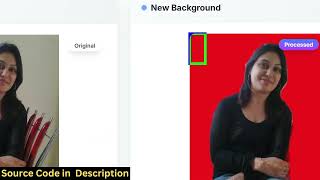

Instant AI Background Removal No API Needed
30sDemonstrates instant background removal using free browser-side AI, impressive without costly APIs.
▶ Play Clip"Title accurately states daily earnings of $10 from ads, but the video is mostly a sales pitch for the source code."
The video presents a Next.js-based Canva clone that offers image background removal, background color changing, and PDF editing features. The creator demonstrates the project's functionality and claims it generates passive income of approximately $10 daily through AdSense and ISOIC advertisements, selling the source code for others to replicate.
A Next.js Canva clone with image and PDF editing capabilities, running as a single-page application.
Background removal is performed directly in the browser using open-source libraries like TensorFlow, without any API calls.
The deployed website generates passive income via AdSense and ISOIC advertisements.
Uses Next.js, TypeScript, and libraries such as PDF-lib, JSPDF, and TensorFlow for background removal.
Additional feature to replace the removed background with a selected color.
Includes tools to convert images to PDF, merge PDFs, and split PDFs into multiple files.
Shows $100 earned in the previous month and approximately $10 daily from ad revenue.
The source code is available for purchase via a link in the description, with instant download from Google Drive.
The video is a promotional walkthrough of a Next.js web app that combines image and PDF editing with ad-based monetization, claiming daily earnings of $10. The creator emphasizes the ease of deployment and the potential for passive income.
What libraries are used for background removal in this Next.js project?
TensorFlow.js (open-source) is used for background removal.
01:16
How much monthly income from AdSense does the creator claim from this tool?
Over $100 in the previous month.
03:33
What are the PDF editing features included?
Convert images to PDF, merge PDFs, and split a PDF into multiple files.
02:52
Is the background removal using a paid API?
No, it uses free open-source libraries.
02:10
What is the daily earning claimed from ads on this web app?
About $10 every day.
04:18
Passive Income from AdSense
Demonstrates that a simple tool website can generate consistent ad revenue.
01:01Use of Free Libraries
All functionality relies on open-source libraries, reducing costs.
01:29Earnings Proof
Provides concrete numbers ($100/month, $10/day) to validate the monetization claim.
03:33[00:02] you a nextJS project that I developed which is actually a Canva clone image directory structure of inside your screen right here. So if you're interested in this project, I also given the link you can directly purchase the
[00:17] full source code. And now let me show you the actual demo of this project. So it has all got all the features which Canva supports. So first of all we have this feature for removing the background from a image. So it's really simple. You
[00:31] simply select the image file that you want to processing is happening directly in the browser and using actually this uh Canva
[00:48] browser and using actually this uh Canva clone editor I also made money as well using AdSense and ISOIC. I will also show you the earnings as well. So I basically uh deployed this website
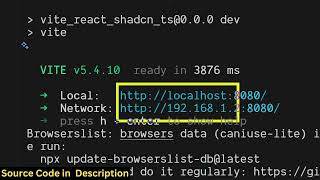
[01:01] and I'm getting some passive income as well using advertisement. So it's a single page application. All the you can just see we are running it locally. I'm just showing you for the demo purpose. It's very easy to deploy as well. It's a
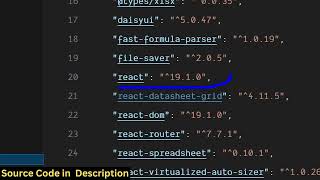
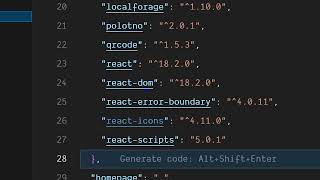
[01:16] nextjs project as you can see we are using the latest version of next. So we are also using some open-source free libraries for this project such as PDF libraries for this project such as PDF lib uh this JSPDF tensorflow for
[01:29] removing the background. So every component is divided into its appropriate TypeScript file. So the project is fully customizable. You can add additional features and also you can easily modify this project and uh
[01:43] similarly you can download this output image once easy. You can select any image. For example, let me select a different image just to show you again. You select the image,
[01:57] you repeat the process and just see the speed of this Canva clone. It's basically removing the background instantly as soon as you select the image. You can do this unlimited number of time. We are not using any sort of
[02:10] API. It's actually using free libraries to actually remove the background. [snorts] And again similarly we have the second feature here. This actually
[02:22] also does the same thing. It actually removes the background and then it also provides you with this additional feature for actually changing the background color. So once you select the background color, it actually changes
[02:36] and replace the background with that color. So it's a really nice feature. You can just see here just select the particular color and then click change background and instantly the background is applied and then we have the PDF
[02:52] editor. So if you want to convert a bunch of images into PDF you can use this tool as well. So it has a bunch of six tools available in a single application. So it's uh really easy to
[03:06] deploy this as well. So it's in Canva clone image and PDF editor. So once you select the image you click convert image to PDF. So once you click the button
[03:18] automatically the PDF file will get downloaded. So similarly we have another downloaded. So similarly we have another tools for merging PDF splitting a long PDF into multiple files. So as you can see these are fullyfledged tools.
[03:33] So if you are interested in this project guys I've given the link in the description you can directly purchase it and once you purchase it automatically the source code will get downloaded from Google drive
[03:46] and also we are running uh I am just show you the AdSense earnings you can just see here previous month I basically earned over $100 using this tool website so it's very easy to deploy this and also there is another ad
[04:02] network which is ISOIC as well. So you can also do the you can purchase this script from me. The link is given and uh it's very easy to deploy this as a it's a single page tool kind of a website which can be monetized using ad network.
[04:18] which can be monetized using ad network. So as you can see from this website only it's giving me a lot of good earnings about $10 every day. So you can even do this as well if you want to earn you can purchase this script. Uh the link is
[04:33] given in the description. So I've also shown you the proof as well of this shown you the proof as well of this script is perfectly working and uh you can even do the same thing by deploying this putting advertisements and also
[04:45] earning passive income. So if you're interested the link is So if you're interested the link is given in the description.
⚡ Saved you 0h 04m reading this? Transcribe any YouTube video for free — no signup needed.