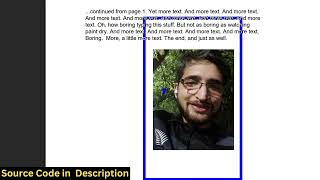

Browser-Based PDF Editor Like Canva
30sShows a fully functional PDF editor running directly in the browser without any server, which is immediately impressive and useful for anyone who needs to edit PDFs quickly.
▶ Play Clip"Title promises building a clone but delivers only a demo and a sales pitch for the source code."
This video demonstrates a Canva-like PDF editor built with ReactJS, TypeScript, and libraries like PDF-LIB and pdfjs-dist. The creator showcases the application's features including PDF viewing, text and image annotation, and export, emphasizing that the source code is available for purchase.
A Canva clone PDF editor developed in ReactJS, running as a single-page app in the browser. Allows PDF viewing, editing, highlighting, and annotation.
Source code is offered for purchase, with a link in the description. It includes TypeScript files and is structured for easy modification and feature addition.
Users can add text, adjust font size, change color using a color picker, and place text anywhere on the PDF pages.
Images can be inserted into PDF pages with control over width, height, and placement.
Changes (text, highlights, annotations, images) are saved and exported as a downloadable PDF file.
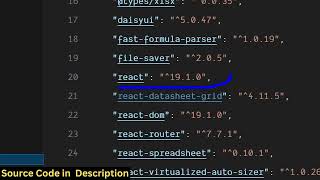
Uses fabricjs, pdf-lib (JavaScript PDF generation), pdfjs-dist (PDF rendering), and React latest version. Easy to run locally and deploy.
The video presents a functional React-based PDF editor with annotation capabilities, but focuses more on promoting the purchased source code rather than providing a building tutorial.
What libraries are used in the PDF editor?
fabricjs, pdf-lib, pdfjs-dist, and React.
03:08
What is pdf-lib used for?
PDF generation in JavaScript.
03:22
Can the user change text color in the editor?
Yes, using a color picker.
01:58
What export function does the editor have?
Export PDF button that downloads the file with all changes.
02:42
Tech Stack Revealed
Lists specific libraries (fabricjs, pdf-lib, pdfjs-dist) that enable the PDF editing functionality.
03:08Export Feature
Demonstrates that all annotations are preserved in the exported PDF.
02:42[00:03] in this video, I'll show you a Canva clone PDF editor application that I developed in ReactJS. I'm just showing you the demo right here. So it directly executes uh in the browser. It's a single page ReactJS application. Canva
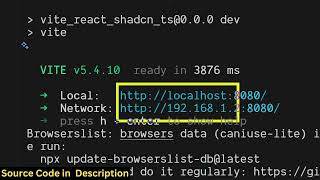
[00:18] clone PDF editor. So we are running it on local host as you can see. So right here you will select your PDF file. It has this advanced editor where you can edit, highlight, annotate your PDF files. Once you select your PDF file, it
[00:33] will render out. It will view, you can read your PDF files directly. So it is having total number of pages, previous page, next page. Then we have this nice little advanced editor. It's entirely developed in ReactJS. I've given the
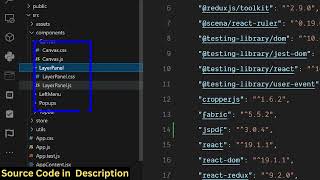
[00:48] source code. You can directly purchase it. The link is given in the you will get actually all the source code from Google drive automatically. This is a directory structure. Each and every file is divided into its
[01:02] appropriate uh TypeScript file here. So once you get the source code, you will able to modify this and add additional features as well. So now I'm just running it on local host. As you can see, we have started this project npm
[01:15] run start. So once the project has started. So this is you can uh actually use these features just click the pencil icon and right here you will be able to
[01:29] first of all navigate. So you can go to the next page like this So you can go to the next page like this using these buttons and then if you want to add some text you basically you can add this. As you
[01:44] can see, we are adding some text right here. We can just place it accordingly. And we can even change the phone size as well. Just select it and just change the phone size
[01:58] using the color picker. Change the color of the text. And then again like this. So you can see how easy it is.
[02:13] accordingly. Same goes with images if you want to add image in the second page. So this is the insert image button. So right here you will select your image wherever you need to place this image.
[02:27] You can change control the width, height, placement accordingly. After that uh then we have this button of export PDF exporting the changes automatically the output file will be downloaded. So all the changes
[02:42] that you have done such as adding the text, highlighting, annotating everything is saved. You can see the image is also added. This is a complete project that I developed in ReactJS. If you are interested guys it's a Canva
[02:56] clone PDF editor static single page application which directly runs in the browser. So the link is given in the description. So I basically used some third party libraries for which is
[03:08] fabricjs. We have also used pdf lib pdfjs.ist version. As you can see this is the package.json file. So
[03:22] package.json file. So pdf lib is a javascript pdf generation library. The pdfjs.dist artist is once again a very famous PDF related library in JavaScript and after all we are also
[03:37] in JavaScript and after all we are also using React the latest version fabric it's very easy to run this locally and also you can deploy this build out this project and build out to a real domain name as well it's very easy to deploy
[03:50] this as well so once you get the source code you will be able to modify this source code and also add additional features is on top of of this project. So the application is quite simple. You basically
[04:11] out your PDF file where you can read all the pages. You have all these basic controls out there. You can navigate to the next page
[04:27] we can even change the background color as well.
[04:45] So here you can just need to first of all select the phone sites ability to insert images. So I've shown you the full demo. If you're interested the link is given in the description you can directly purchase it.
⚡ Saved you 0h 05m reading this? Transcribe any YouTube video for free — no signup needed.