
I built a Canva clone in a single HTML file
42sThis hook shows how a powerful PDF editor can be built with no backend, appealing to developers and tech enthusiasts looking for lightweight solutions.
▶ Play Clip"Title promises a tutorial but delivers only a sales demo of the finished product."
This video demonstrates a Canva clone PDF design tool built entirely in a single HTML file with no backend. The tool allows users to edit PDFs by highlighting, annotating, adding text, images, and notes, then exporting the result. The creator showcases the features and offers the source code for purchase.
A single index.html file (2200 lines) that runs directly in the browser with no backend. It is a Canva clone for editing and generating PDFs.
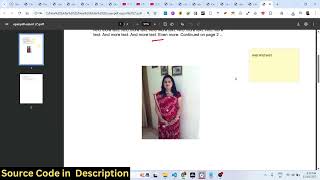
Users can select a PDF file, see the number of pages, and highlight/annotate using the mouse. Navigation to next page is supported.
Users can add text at any location and place images, adjusting their size as needed. The tool also allows hiding PDF text.
Users can take notes at any location. After editing, the export PDF button compiles all changes (text, images, highlighting) into a final PDF. Highlight color can be changed.
The tool includes options to add blank pages, duplicate pages, or delete pages. All operations are done within the single-page application.
The video presents a fully functional PDF editor built with HTML, CSS, and JavaScript, available for purchase as a single-file source code. No backend is required, making it easy to deploy and modify.
How many lines of code is the Canva clone?
Almost 2200 lines.
00:19
What kind of application is the tool?
A single-page application with no backend, running in the browser.
00:19
What operations can be performed on PDF pages?
Add blank page, duplicate page, or delete pages.
02:00
Single-file no-backend architecture
Demonstrates that complex PDF editing can be done entirely client-side with 2200 lines of code.
00:19Export PDF with all annotations
Shows the tool compiles all edits (text, images, highlights) into a final PDF export.
01:28[00:02] you I built out a Canva clone PDF design tool with the phones uh everything built in. So it's a Canva clone design tool where you can actually edit your PDF files or generate PDF files as well. So this is a single index.html file. Uh it
[00:19] directly runs in the browser. There is no back end to it. So this is a single no back end to it. So this is a single file about almost 2200 lines of code is there. So you can directly purchase it. The link is given. After purchasing it,
[00:31] you will get the source code from Google Drive. And coming back to the application in this Canva clone design tool, you first of all select the PDF file. After selecting that, the number of pages will show. And now you will be
[00:44] able to actually highlight annotate anything. Simply using your mouse, go to the next page. Do the same thing. So it will save you a lot of time. You can even add text as well. So simply select the location. You also have the
[00:58] capability to add images as well. So you can actually place it accordingly wherever you want to place it. You can even adjust the size as well. So also we have capability to hide something using this operator. You can
[01:13] something using this operator. You can hide the PDF text really easily. And uh then you can even take a note as well at any location. And after that we have this button to export PDF. So after doing this
[01:28] see all the text images highlighting that you done. You can even change the color of the highlighting as well really simply. So you can just see here all the options are there. It's a fully flushed Canva clone design tool or editor which
[01:45] allows you to directly edit your PDF files. So it's a single page application. There is no back end to it. So you can directly purchase this source code. You can easily modify it and add additional features on top of this as
[01:59] well. So it's entirely built in HTML, CSS and JavaScript. So you apart from that we also have options to add a blank page, duplicate page or you can even delete pages as well. Simply select
[02:19] So if you're interested guys, the link is given in the description.
⚡ Saved you 0h 02m reading this? Transcribe any YouTube video for free — no signup needed.