
Is the Razer Siren V3 Mini Worth It?
46sViewers love seeing budget gear tested with honest expectations.
▶ Play Clip"The title promises a budget microphone comparison for gaming and streaming, and the video delivers exactly that, with thorough testing and recommendations."
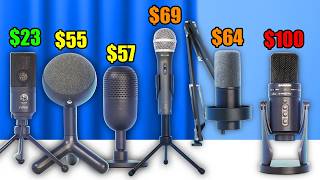
This video reviews and compares seven different microphones all priced under $100, focusing on their sound quality, features, and suitability for gaming and streaming. The reviewer tests each microphone in desk-stand and boom-arm configurations, including keyboard typing tests, to provide a comprehensive comparison.
The video compares all microphones under $100.
The microphone is tested on its stand and on a microphone arm. It has a high rating on Amazon but is expected to perform less when far from the mouth. It includes a mute button and red LED indicator.
This mic is USB-C and XLR, includes an XLR cable and pop filter. It has a mic jack for zero-lag monitoring. Priced at $70, it is recommended for studio-quality podcasting without needing a boom arm.
This mic is XLR and USB-C, designed for a microphone arm. The kit includes the Fifine CS1 arm with a shock mount. It has headphone monitoring, gain knob, and headphone volume. It costs $54, with a $14 kit option for the arm.
The Yeti Orb has a cloth design and a bulky but light stand. It connects to a microphone arm. It uses Logitech G Hub software with presets for EQ, high-pass filter, and voice effects.
This mic is very sensitive and appears loud in OBS. It does auto-leveling and sounds warm and full out of the box. It is a popular kit on the channel.
This $99 mic is heavy and versatile with cardioid, figure-eight, and omni polar patterns. It is the most expensive and has good build quality, but sound quality alone may not justify the price.
At $23, this is the cheapest mic. It has a volume knob but no mute. It is a no-frills mic that provides excellent value and sound quality for the price.
The reviewer plays recorded sound tests of all microphones, including voice and keyboard typing tests, to let viewers decide which sounds best.
Top picks: K669B ($23) for cheapest option, Fifine K688 (~$63) for best value under $50, and Samsung Q2U ($79) for pure sound quality. The Pseudotech SD800 is not recommended.
For budget-conscious buyers, the Fifine K669B ($23) offers the best value, while the Fifine K688 (~$63) and Samsung Q2U ($79) are excellent choices for those wanting better sound quality and features without breaking the bank.
What is the price of the Samsung Q2U microphone?
$70
1:20
Which microphone costs $99 and offers cardioid, figure-eight, and omni polar patterns?
Samsung GTR Pro
4:46
What is the price of the cheapest microphone tested, the Fifine K669B?
$23
6:28
Which microphone has a mic jack for zero-lag monitoring?
Samsung Q2U
1:23
What software does the Blue Yeti Orb use for EQ and voice effects?
Logitech G Hub
3:21
Fifine K669B: Best Value
At $23, this microphone offers exceptional build and sound quality, making it a no-brainer for budget buyers.
6:17Fifine K688 Kit Value
Including a microphone arm with shock mount for only $14 extra, this kit provides excellent value and professional features.
1:48Samsung GTR Pro Polar Patterns
The microphone offers cardioid, figure-eight, and omni patterns, making it versatile for different recording situations.
4:46Top Three Recommendations
The reviewer recommends the Fifine K669B, Fifine K688, and Samsung Q2U as the best choices, each for different budgets and needs.
10:10[00:00] All of these microphones are below $100.
[00:02] We're going to compare all of them and
[00:04] we'll start with the Razer Siren V3
[00:06] Mini. Now, it does come with a stand.
[00:08] You can connect it to a microphone arm
[00:10] if you want. So, I just looked it up on
[00:12] Amazon. It is definitely not the most
[00:14] popular microphone out of all of them,
[00:16] but it has a very high rating. And
[00:18] that's why it intrigued me so much to
[00:20] test this version. So, this is a test of
[00:22] the Razer Siren V3 Mini. I expect it to
[00:25] perform a bit less than the other
[00:26] microphones when standing on your desk.
[00:29] Mainly because it's so small and it's so
[00:31] far from your mouth, but maybe it's
[00:32] fine. And I'll move it closer to my
[00:34] mouth. This is what it will kind of
[00:36] sound like when it's on a microphone arm
[00:38] close to you. And on top, there's also a
[00:40] mute button to mute your microphone. And
[00:42] you can also see the LED on the front
[00:44] going red whenever you mute the
[00:46] microphone. Next, we have the Samsung
[00:48] Q2U. It clearly doesn't look like a
[00:50] gaming microphone. However, it is often
[00:53] recommended as a choice that you make
[00:54] when you don't really care about the
[00:56] looks and you want a studio quality
[00:58] podcasting microphone. You also don't
[01:00] really need a microphone arm because
[01:02] well, the microphone is super tall. So,
[01:04] if you want a boom arm for the looks,
[01:06] you can get it. But for the sound
[01:08] quality, it won't really matter. It is
[01:10] both USBC and XLR. So, if you have an
[01:13] audio interface, you can use the XLR.
[01:15] They even include an XLR cable. And they
[01:17] also include a pop filter or windshield
[01:19] on the front here. Currently, you can
[01:20] get this one for $70. You also have a
[01:23] mic jack, by the way. So, if you want to
[01:25] plug your headset into this so you can
[01:27] monitor yourself without any lag, you
[01:29] can do that. So, this is what the mic
[01:31] sounds like. I don't even need to hold
[01:32] it closer to my mouth to show you what a
[01:34] mic will do because it's the perfect
[01:36] distance. You can use a mic if you want
[01:38] to free up your desk. Absolutely. But
[01:40] for the sound quality and performance,
[01:43] it is not needed. All right. Next, I
[01:45] want to test the Fifine Amplitank K688.
[01:48] It says on the box it's also an XLR and
[01:51] USBC mic. This microphone is meant to be
[01:54] connected to a microphone arm. It does
[01:55] look very much like a podcasting and
[01:58] streaming mic. And so for this I will
[02:00] use the Fifine CS1 since that's the mic
[02:02] arm that you will get if you buy the
[02:04] kit. It comes with a clamp and then with
[02:07] the arm itself. I do see that it has a
[02:09] shock mount which is great because that
[02:11] means that vibrations coming from the
[02:12] desk will not travel through the arm and
[02:14] to the mic because the shock mount. Now
[02:16] I do see some buttons on the back. So we
[02:19] do have a headphones monitoring jack as
[02:21] well. Then USBC or XLR to connect it to
[02:24] your PC. This is the gain knob for the
[02:26] sensitivity of the microphone. And then
[02:28] this is the headphone monitoring volume.
[02:30] And then this is how you would use it on
[02:32] stream. Okay. Test test test. I do like
[02:34] the sound. So this is from the front.
[02:36] This is from the side. It cancels a lot.
[02:38] Okay. And this is from the back.
[02:40] Currently you can get it for $54. It's
[02:42] available in black, pink, and white. And
[02:45] then for $14 more, you can get the kit
[02:47] with a microphone arm included. This one
[02:49] is also bought 3,000 times. So, this is
[02:51] a really popular mic, and this will look
[02:53] really clean in a white themed setup.
[02:56] All right, the next microphone I want to
[02:58] test is the Blue Yeti Orb. I've never
[03:00] tested it, but I'm really curious to
[03:02] check it out. And I'm not sure about
[03:03] this. It's weird with all the cloth all
[03:06] around. It looks like something to put
[03:07] in your living room, but then the bottom
[03:09] here, it's the lightest stand I've ever
[03:11] seen. It's super bulky, but empty
[03:13] plastic. And I mean it makes it feel a
[03:15] bit like a kid toy. You can connect it
[03:17] to a microphone arm with this if you
[03:19] want. Yeah, let's plug it in. So I just
[03:21] installed the software. This program is
[03:23] the Logitech G Hub by the way. So it has
[03:25] a preset for equalizing highp pass
[03:27] filter voice EQ. Like if you move the
[03:30] lows higher, you will have a really deep
[03:31] voice. You will sound like pirate
[03:33] software. This is what he's doing with
[03:35] his voice. Maybe he does this as well.
[03:37] And then this I worked at Blizzard 8
[03:40] years. Yes. And you can absolutely
[03:42] change the effects, but you can do that
[03:43] with all of these microphones. All
[03:45] right, the next microphone I want to
[03:47] test is the Pseudotech SD800.
[03:50] If you're an OG of the channel, you will
[03:52] recognize this microphone kit. Whenever
[03:54] I add it to a video, people in the
[03:56] comments absolutely love this
[03:57] microphone. It seems to be too
[03:59] sensitive, so I'm going to have to
[04:01] search it here. It shows up without a
[04:03] name. Uh, but the levels are set to 100.
[04:05] Let's just reduce this. Hello. Test test
[04:07] test. It shows up as very loud in OBS,
[04:10] but I don't think it's peing. I will
[04:12] talk closer into the microphone. It
[04:13] seems like it's doing some autoleveling
[04:15] because usually it should be peing if
[04:17] I'm this close. Okay, so this is what it
[04:19] sounds like at a reasonable distance
[04:21] from my mouth. Of course, you can also
[04:23] achieve that with the other ones with
[04:24] effects, but out of the box, this one
[04:26] will probably sound the most warm and
[04:28] full, deep, and all of that good stuff.
[04:31] Then next, we have the Samsung GTR Pro.
[04:34] This is a very heavy microphone. It's
[04:37] also clearly the same brand as the one
[04:39] we've tested before, the Q2U. And I'm
[04:41] curious because I think in terms of pure
[04:43] sound quality, it's not going to be
[04:45] worth paying more for this one. I think
[04:46] it's $99, while this one is about $79.
[04:50] But of course, you should not see them
[04:51] as the same microphones. Now, you can
[04:53] connect it to a microphone arm using
[04:56] this adapter that they include, but
[04:57] since the microphone is so big and it
[04:59] comes so high, it's not really
[05:01] necessary. Now, this mic is way more
[05:04] versatile than the other one from the
[05:06] same brand. And also for streaming, I'm
[05:08] just not sure if you need the
[05:09] versatility, but your use case might be
[05:11] different. But I'm very curious how it
[05:13] will sound. So, it's at cardioid right
[05:15] now, which means that it will push down
[05:16] my voice right now. Also, from the back,
[05:19] it will record way less than like this.
[05:21] But if I put it to figure eight, I think
[05:23] you will hear it reducing a bit from the
[05:25] side, but then when I go to the back, it
[05:27] will start recording fully again. So, it
[05:29] fully records from two sides. And then
[05:31] if you put it to omni then it uses both
[05:33] but then it sounds lower quality. So
[05:35] that's really in a group setting but
[05:37] indeed if you check it like this it
[05:39] doesn't really make much difference
[05:40] where you record from. It just records
[05:43] everything around. This is a test on
[05:45] omni. This is a test on figure 8. This
[05:49] is a test on cardioid. I really like the
[05:51] microphone. It is beefy. It looks super
[05:53] cool. It feels and looks like a quality
[05:55] product. It's also the most expensive
[05:57] one. It's $99. And if the sound quality
[06:00] of it just being on your desk to stream
[06:02] or to do YouTube is the only thing that
[06:04] matters to you, it's probably not going
[06:06] to be the best purchase purely on sound
[06:08] quality. But if any of the other
[06:09] features are interesting to you, then it
[06:11] might be an interesting product. I mean,
[06:13] I'm looking at the preview. That's a
[06:14] beefy mic. All right, next we have the
[06:17] cheapest microphone of them all, the
[06:19] Fifine K669B. I've used it in many
[06:22] setups because it's just one of the best
[06:24] options to buy if you want to pay the
[06:26] least amount of money for the best build
[06:28] quality and sound that you're going to
[06:30] get for about $23. This microphone gives
[06:33] you crazy value for your money. There is
[06:36] a volume knob here on the top. You
[06:38] cannot mute with it. You cannot press
[06:40] it. The mic simply stands on your desk,
[06:42] plugs into your PC, it sends some sound.
[06:44] That's the only thing it does. But it
[06:46] does it very well for the price. Okay.
[06:48] Now, there is something very important I
[06:50] need to mention. if you're even
[06:51] considering this mic, but I'll explain
[06:53] it while testing. Let's do a quick test
[06:55] first. So, this is what it sounds like
[06:57] on your desk when it's leveled pretty
[07:00] correctly. And then I will reduce the
[07:02] gain so we can hold it close to our
[07:05] mouth. Okay, then this is kind of what
[07:07] it sounds like. It is time right now to
[07:09] listen to all the microphones back to
[07:11] back. I recorded tests with all of them.
[07:13] So, I'm just going to let them play and
[07:15] then I'm going to let you decide for
[07:16] yourself which one you like best. This
[07:19] is a test of the Razer Siren V3 Mini
[07:22] standing on my desk. This is a test of
[07:24] the Razer Sarin V3 Mini on a microphone
[07:27] arm. This is a keyboard typing test of
[07:30] the Razer Sarin V3 Mini while it's
[07:32] standing on my desk. And this is a
[07:34] typing test of the Razer Sarin V3 Mini
[07:37] while it's on a microphone arm. This is
[07:39] a test of the Samsung Q2U standing on my
[07:42] desk. We don't have to test the
[07:44] microphone arm because it is already
[07:46] very close to my mouth. And then this is
[07:48] a keyboard typing test of the Samsung
[07:50] Q2U while it's standing on my desk. This
[07:54] is a test of the Fifine K688 microphone
[07:58] together with the Fifine CS1 microphone
[08:01] arm. If you buy them as a kit, it's
[08:03] called the Fifine K688CT.
[08:06] And this microphone does not come with a
[08:08] stand. So you need a microphone arm,
[08:10] which is why we only test it like that.
[08:12] And then this is a keyboard typing test
[08:14] of the Fifine K688 on a microphone arm.
[08:18] This is what the Logitech Yeti Orb will
[08:20] sound like when it's standing in front
[08:22] of you on your desk. This is what it
[08:24] will sound like when it's on a boom arm
[08:26] close to your mouth. This is what it
[08:29] will sound like when it's standing on
[08:30] your desk and you're typing your
[08:32] keyboard while gaming without any AI
[08:34] noise reduction effects or anything like
[08:36] that. And this is a test of keyboard
[08:38] sounds in the background while the
[08:40] microphone is on a boom arm close to
[08:42] your mouth. This is a test of the Pseudo
[08:45] Techch SD800 on a microphone arm. There
[08:48] is no point testing it without because
[08:49] it only comes as a kit. There is also a
[08:52] pop filter included in the box, but as
[08:54] long as you're not talking into the
[08:56] microphone and doing things like that,
[08:58] you're not going to have a problem and I
[08:59] just don't like the look of it hanging
[09:01] here. And then this is a test of the
[09:03] Sudoch SD800 while typing on my keyboard
[09:06] on my desk. This is a sound test of the
[09:09] Samsung Greg Pro while it's standing on
[09:12] my desk in front of me. And this is what
[09:14] it sounds like close to your mouth if it
[09:16] were on a boom. This is a test of typing
[09:19] my keyboard in the background while the
[09:21] Samsung GRA Pro is standing on my desk
[09:24] in front of me. And this is a keyboard
[09:26] typing test while the microphone is
[09:28] close to my mouth with the keyboard
[09:30] further away in the background. This is
[09:33] a sound test of the Fifine K669B while
[09:36] it's standing in front of me on my desk.
[09:39] And this is a test of the microphone
[09:41] when it's close to your mouth on a boom
[09:43] arm. And this is a test of the Fifine
[09:45] K669B while typing my keyboard in the
[09:48] background when it's on my desk. And
[09:50] this is a test of the Fifine K669B while
[09:54] the keyboard is being typed on in the
[09:56] back. And as a side note, the Fifine A6V
[10:00] sounds exactly the same as this
[10:02] microphone. So you can just know that if
[10:04] you buy that one, it will sound like
[10:06] this. It will just have RGB and a pop
[10:09] filter. As the absolute cheapest option,
[10:11] I think the K669B is amazing. It's $23.
[10:15] It sounds really good. It's built well.
[10:17] It's a no-brainer. If you want below
[10:19] $30, then the pseudo tech I really
[10:21] wouldn't recommend. And if you want to
[10:23] spend 50, I would definitely spend about
[10:26] 63 or something for the Fifine K688.
[10:30] It looks like a stereo microphone. It
[10:32] sounded really warm and full, but not in
[10:34] a bad way like the Sudotech mic. And
[10:37] another mic I also really liked is the
[10:39] Samsung Q2U. It is still more expensive
[10:42] than the K688. It also doesn't look like
[10:45] a live streaming or gaming microphone,
[10:47] but I really love the pure sound quality
[10:50] performance of this. It is $79 though.
[10:53] But that's about my three favorites. I
[10:55] really think you can't go wrong with
[10:57] either of these three. I will link
[10:59] everything mentioned in the description.
[11:01] Thanks a lot for watching. Subscribe to
[11:03] the channel if you want to see more
[11:04] content like this, and I hope that I
[11:06] will see you in the next video. Have a
[11:09] nice day.



⚡ Saved you 0h 11m reading this? Transcribe any YouTube video for free — no signup needed.